Basic commands and scripting class at Free Software Master

This weekend I’ve taught the first sessions at Caixanova Free Software Master. It consisted of a brief introduction to basic command line tools and some concepts about shell scripting and regular expressions tools.

All the course slides are licensed under a Creative Commons license. Until we finish to set up the course collaborative platform, the slides and exercises will be available in my personal web page. I’ll update this link when a final destination for those materials is found.

In addition, Ive compiled some interesting links related to the subject, which can be found in this dedicated Delicious section.

Pam_preprofile 1.1, a swiss army knife for PAM

Pam preprofile is a PAM module that ensures that some program or script is run each time a user logs into the computer. It’s suited for network administrators when they can’t rely on a particular shell to execute the user’s .profile, .bash_profile, .bashrc or similar… because sometimes the user home directory doesn’t even exist yet.

There are already many PAM modules out there, each one suited to a particular need (mounting shares, creating tmp dirs, etc.), but the real advantage of pam_preprofile is its versatility. Pam_preprofile can be used to satisfy any need not being implemented by any existing PAM module at this time but which can be written as a script by the system admin.

The configuration is simple. Just install the module at /lib/security/ and add this line at the end of /etc/pam.d/common-session:

session required pam_preprofile.so /tmp/myprogram.sh /usr/doc

That will call /tmp/myprogram.sh every time the user starts a session (logs into the desktop), passing it a “/usr/doc” parameter, plus an extra parameter with the username being authenticated.

In the previous version of the module, the script was executed always at the session stage. It was very helpful to create the user account. But some weeks ago, a network administrator presented me a scenario where he needed to execute the script each time the system asked the user for a password (that is, at “auth” stage), because the user info could have been updated meanwhile and some local configuration should be updated based on that.

I then improved the module and the new 1.1 version is out. It allow scripts to be executed in the PAM stage you want (account, auth, password and session), not only at the “session” stage allowed by the previous version.

Are you a network administrator? You can download it from:

http://community.igalia.com/twiki/bin/view/Corunix/ProjectDownloadStable

I’ve a landline phone number in USA

I know, I know… having a landline phone number in USA isn’t uncommon if you live there. But the fact is that I don’t live there.

The phone number is offered for free by IpKall and it’s binded to my Gizmo SIP account (VoIP). That way, when you call that number, and if I’m logged into my Gizmo account, I can receive your call. Moreover, if you’ve a Skype account it should be cheap for you to call me. Yes, you’ve catched it: it’s the perfect and cheap (but not free) SIP-Skype bridge.

In fact, I’m thinking to bind the number to the SIP account of the PolyCom we’ve in the office. That way, we could set up a multiconference among some Skype users and the PolyCom.

P.S.: I’m not showing here the real phone number nor the Gizmo account for privacy reasons. If you’d like to know them, just contact me.

A safe upgrade to Diablo

At the end, Maemo Diablo release for N810 is out. But if you have valuable information, programs or configuration on it maybe you’re worried about what you’ll loose in a reflashing. In fact, if you’ve done the upgrade yet you’ll notice that the main part of the apps from Extras repository are missing in Diablo for the moment. Fortunately, there’s a way to install the apps from the old Chinook repository.

Here are six simple steps to perform the upgrade process and restore all your current applications:

  1. Backup your /home/user to a safe place by hand. Standard backup tool won’t
    backup every file you’ve at home and maybe you could need them later…
  2. Do a backup using the backup tool.
  3. Reflash the device with the new image using the flasher tool according to the reflashing instructions
  4. Restore the backup. Some old apps will remain grayshaded because the backup
    tool can’t find them in the now current Diablo repository.
  5. Open Application Manager. Menu, tools, application catalog. Maemo Extras,
    edit. Distribution: chinook, uncheck the “disabled” checkbox, Accept. Close.
  6. Menu, tools, restore applications. Accept.

That’s all. Enjoy your updated device!

How to send SMS in Linux using Skype

Skype for Linux doesn’t support SMS sending from the user interface. But that functionality is in fact implemented in the library and external apps can use it via the public API. I’ve found a working example of that nice feature. Just do these simple steps:

  1. Download Skype4Py from here, uncompress it and install it typing sudo python setup.py install
  2. Download Skype tools 0.11 from here and uncompress it
  3. Open your Skype client and prepare for the authorization dialog that will appear when you execute the next step
  4. Enter into the previous directory and send the SMS: ./send_sms.py +34123123456 My test sms

If the message takes too much to be sent, stop the app (CTRL+C), delete the authorization using the Skype options dialog, and try again. Third and next times worked fine for me.

Shishen Sho Mahjongg 0.3 released

Version 0.3 of Shishen Sho Mahjongg has just been released. The main improvements since 0.2 are: Gravity, hints, undo history, time counter and speed improvements.

You can download the game and know more about it visiting the project page at Maemo Garage.

Enjoy it!

Click here to install this application

28/05/2008 UPDATE: Now the application is also available in Maemo Extras repository and listed in Maemo Downloads with its own green “click to install” icon 🙂

Shishen Sho Mahjongg 0.2 released

Last month I published Shishen Sho Mahjongg for Gtk and Maemo, a board game similar to Mahjongg where the goal is to remove all the tile pairs and two tiles can be removed if a line with a maximum of three segments can be drawn between them.

Today I’m announcing version 0.2. The main improvements since 0.1.1 are Hildon integration (fullscreen, embedded menu, notifications) through conditional compilation and drawing of matching path when two pieces are matched.

You can download the game and know more about the project following these links:

Feel free to send me your comments, suggestions or patches over the original Vala sources.

Thank you! 🙂

Setting up Vala on Maemo and CPP integration

Until now, when I wanted to build some Vala source code for the Maemo platform I generated C code using the i386 Vala compiler and then builded the executable inside the scratchbox using gcc. That was fine until I wanted to use Hildon features (not available for i386). I definitely needed the Vala compiler running on the scratchbox.

This weekend I’ve put myself on the way and managed to compile Vala 0.3.2 on the scratchbox for the CHINOOK_ARMEL target. The process was much simpler than I expected and consisted of these few steps:

  1. Log into the scratchbox and choose CHINOOK_ARMEL
  2. Download the compiler from http://live.gnome.org/Vala/Release (I tried version 0.3.2)
  3. Untar it: tar jxvf vala-0.3.2.tar.bz2
  4. Enter the vala-0.3.2 directory and configure the package for ARMEL cross compiling: ./configure --host=armel
  5. Compile and install: make; make install

Alternately, to build for target CHINOOK_X86, repeat the previous steps but logged into the CHINOOK_X86 target. In step 3, issue ./configure without arguments instead.

That’s it. You have now the Vala compiler ready to be used. But if you want to develop a multiplatform project, you’ll need to avoid compilation of the Hildon related code when not building for Maemo target. The best way I found to do that was to use CPP as a preprocessor to allow me to use #ifdef’s in the code.

This is a simple way to use CPP to preprocess a single file:

cpp -P -Dsymbol1 -Dsymbol2 ... source.vala destination.vala

But I’ve managed to tweak my compilation script to preprocess all the files, write the result to a directory called CPP and finally compiling the result. Here’s the source:

# File compile.sh
export DEFINE=""
export APPNAME="myapp"
export PACKAGES="--thread --pkg gtk+-2.0 --pkg gdk-2.0 --pkg libglade-2.0 --pkg gmodule-2.0"

# Perform preprocessing and output to CPP directory
# Arguments to this script are "defined" and passed to CPP
for i in $@
do
 DEFINE="$DEFINE -D$i"
 case $i in
  MAEMO)
   PACKAGES="$PACKAGES --pkg hildon-1"
   ;;
 esac
done
if [ ! -d CPP ]; then mkdir CPP; fi
for f in *.vala; do cpp -P $DEFINE $f CPP/$f; done
valac $PACKAGES CPP/*.vala -o $APPNAME -X -g -X "-Wl,--export-dynamic -rdynamic"`
rm -rf CPP

The compile.sh script can be used by passing it the symbol set that should be defined. For instance, ./compile.sh MAEMO DEV would define both MAEMO and DEV symbols. Note that with this approach you should check the source files in the CPP directory when errors happen, because the line numbers referenced by the Vala compiler will be related to them and not to the original files.

I think this approach will be useful for other programmers too, so I’ve contributed it to the Vala FAQ (Does Vala have a preprocessor?).

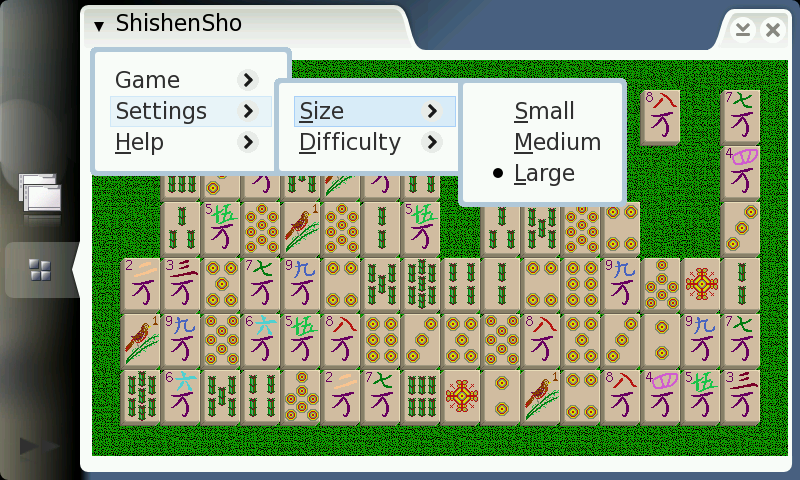
Shishen Sho Mahjongg for Gtk and Maemo

Shishen Sho Mahjongg is a board game similar to Mahjongg. The goal is to remove all the tile pairs. Two tiles can be removed if a line with a maximum of three segments can be drawn between them.

Both the idea and the tile images were taken from kshishen (Shishen Sho 1.5.1), from the package kdegames, which is (C) 1997, Mario Weilguni and distributed under GPL license.

My girlfriend and me are fans of kshishen, so I needed to make a Maemo version to let her play on the N810 internet tablet, free my laptop and let me work on it. O:-)

The game is written in Vala and licensed under the GPL. Vala is a programming language that produces C/GObject source code which can also be compiled independently without the need of the original Vala compiler. Currently, two platforms are supported for the game: i386 (a desktop distribution, eg: Ubuntu Feisty), and also Maemo platform (armel).

21/04/2008 UPDATE: New version 0.1.1 available. Features improved compilation scripts, improved debian package structure and proper installation support from Maemo application manager.

Feel free to send me your comments, suggestions or patches over the original Vala sources. I hope you enjoy the game as much as I enjoyed writing it. 😀