Igalia Multimedia contributions in 2025

Now that 2025 is over, it’s time to look back and feel proud of the path we’ve walked. Last year has been really exciting in terms of contributions to GStreamer and WebKit for the Igalia Multimedia team.

With more than 459 contributions along the year, we’ve been one of the top contributors to the GStreamer project, in areas like Vulkan Video, GstValidate, VA, GStreamer Editing Services, WebRTC or H.266 support.
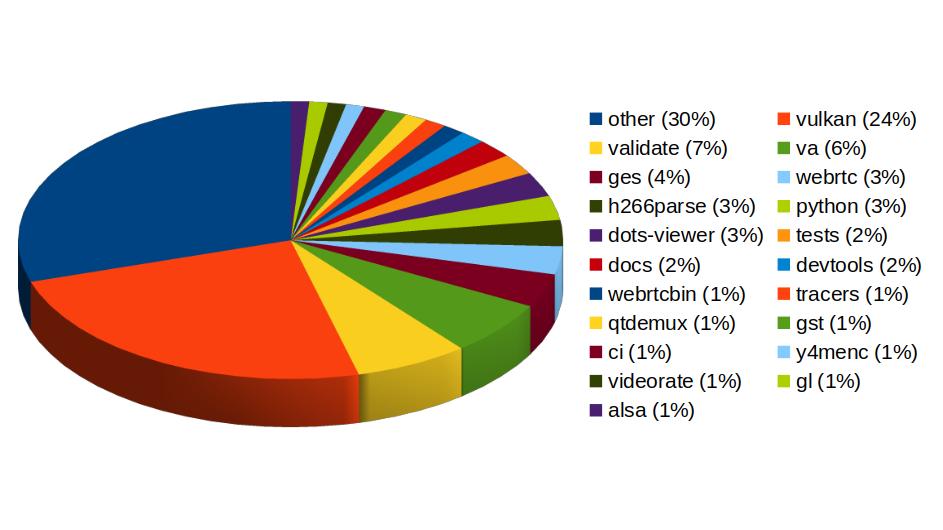
Pie chart of Igalia's contributions to different areas of the GStreamer project:
other (30%)
vulkan (24%)
validate (7%)
va (6%)
ges (4%)
webrtc (3%)
h266parse (3%)
python (3%)
dots-viewer (3%)
tests (2%)
docs (2%)
devtools (2%)
webrtcbin (1%)
tracers (1%)
qtdemux (1%)
gst (1%)
ci (1%)
y4menc (1%)
videorate (1%)
gl (1%)
alsa (1%)
Igalia’s contributions to the GStreamer project

In Vulkan Video we’ve worked on the VP9 video decoder, and cooperated with other contributors to push the AV1 decoder as well. There’s now an H.264 base class for video encoding that is designed to support general hardware-accelerated processing.

GStreaming Editing Services, the framework to build video editing applications, has gained time remapping support, which now allows to include fast/slow motion effects in the videos. Video transformations (scaling, cropping, rounded corners, etc) are now hardware-accelerated thanks to the addition of new Skia-based GStreamer elements and integration with OpenGL. Buffer pool tuning and pipeline improvements have helped to optimize memory usage and performance, enabling the edition of 4K video at 60 frames per second. Much of this work to improve and ensure quality in GStreamer Editing Services has also brought improvements in the GstValidate testing framework, which will be useful for other parts of GStreamer.

Regarding H.266 (VVC), full playback support (with decoders such as vvdec and avdec_h266, demuxers and muxers for Matroska, MP4 and TS, and parsers for the vvc1 and vvi1 formats) is now available in GStreamer 1.26 thanks to Igalia’s work. This allows user applications such as the WebKitGTK web browser to leverage the hardware accelerated decoding provided by VAAPI to play H.266 video using GStreamer.

Igalia has also been one of the top contributors to GStreamer Rust, with 43 contributions. Most of the commits there have been related to Vulkan Video.
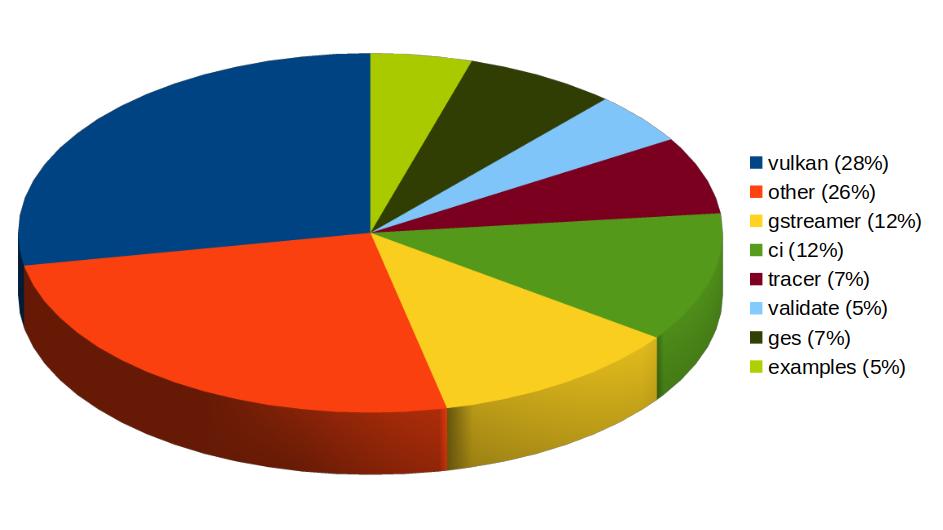
Pie chart of Igalia's contributions to different areas of the GStreamer Rust project:
vulkan (28%)
other (26%)
gstreamer (12%)
ci (12%)
tracer (7%)
validate (5%)
ges (7%)
examples (5%)
Igalia’s contributions to the GStreamer Rust project

In addition to GStreamer, the team also has a strong presence in WebKit, where we leverage our GStreamer knowledge to implement many features of the web engine related to multimedia. From the 1739 contributions to the WebKit project done last year by Igalia, the Multimedia team has made 323 of them. Nearly one third of those have been related to generic multimedia playback, and the rest have been on areas such as WebRTC, MediaStream, MSE, WebAudio, a new Quirks system to provide adaptations for specific hardware multimedia platforms at runtime, WebCodecs or MediaRecorder.
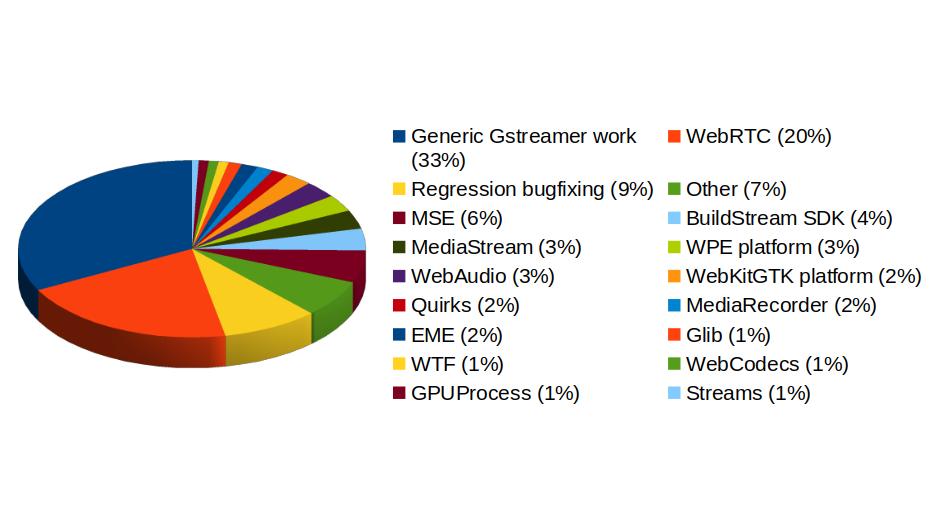
Pie chart of Igalia's contributions to different areas of the WebKit project:
Generic Gstreamer work (33%)
WebRTC (20%)
Regression bugfixing (9%)
Other (7%)
MSE (6%)
BuildStream SDK (4%)
MediaStream (3%)
WPE platform (3%)
WebAudio (3%)
WebKitGTK platform (2%)
Quirks (2%)
MediaRecorder (2%)
EME (2%)
Glib (1%)
WTF (1%)
WebCodecs (1%)
GPUProcess (1%)
Streams (1%)
Igalia Multimedia Team’s contributions to different areas of the WebKit project

We’re happy about what we’ve achieved along the year and look forward to maintaining this success and bringing even more exciting features and contributions in 2026.

Dissecting GstSegments

During all these years using GStreamer, I’ve been having to deal with GstSegments in many situations. I’ve always have had an intuitive understanding of the meaning of each field, but never had the time to properly write a good reference explanation for myself, ready to be checked at those times when the task at hand stops being so intuitive and nuisances start being important. I used the notes I took during an interesting conversation with Alba and Alicia about those nuisances, during the GStreamer Hackfest in A Coruña, as the seed that evolved into this post.

But what are actually GstSegments? They are the structures that track the values needed to synchronize the playback of a region of interest in a media file.

GstSegments are used to coordinate the translation between Presentation Timestamps (PTS), supplied by the media, and Runtime.

PTS is the timestamp that specifies, in buffer time, when the frame must be displayed on screen. This buffer time concept (called buffer running-time in the docs) refers to the ideal time flow where rate isn’t being had into account.

Decode Timestamp (DTS) is the timestamp that specifies, in buffer time, when the frame must be supplied to the decoder. On decoders supporting P-frames (forward-predicted) and B-frames (bi-directionally predicted), the PTS of the frames reaching the decoder may not be monotonic, but the PTS of the frames reaching the sinks are (the decoder outputs monotonic PTSs).

Runtime (called clock running time in the docs) is the amount of physical time that the pipeline has been playing back. More specifically, the Runtime of a specific frame indicates the physical time that has passed or must pass until that frame is displayed on screen. It starts from zero.

Base time is the point when the Runtime starts with respect to the input timestamp in buffer time (PTS or DTS). It’s the Runtime of the PTS=0.

Start, stop, duration: Those fields are buffer timestamps that specify when the piece of media that is going to be played starts, stops and how long that portion of the media is (the absolute difference between start and stop, and I mean absolute because a segment being played backwards may have a higher start buffer timestamp than what its stop buffer timestamp is).

Position is like the Runtime, but in buffer time. This means that in a video being played back at 2x, Runtime would flow at 1x (it’s physical time after all, and reality goes at 1x pace) and Position would flow at 2x (the video moves twice as fast than physical time).

The Stream Time is the position in the stream. Not exactly the same concept as buffer time. When handling multiple streams, some of them can be offset with respect to each other, not starting to be played from the begining, or even can have loops (eg: repeating the same sound clip from PTS=100 until PTS=200 intefinitely). In this case of repeating, the Stream time would flow from PTS=100 to PTS=200 and then go back again to the start position of the sound clip (PTS=100). There’s a nice graphic in the docs illustrating this, so I won’t repeat it here.

Time is the base of Stream Time. It’s the Stream time of the PTS of the first frame being played. In our previous example of the repeating sound clip, it would be 100.

There are also concepts such as Rate and Applied Rate, but we didn’t get into them during the discussion that motivated this post.

So, for translating between Buffer Time (PTS, DTS) and Runtime, we would apply this formula:

Runtime = BufferTime * ( Rate * AppliedRate ) + BaseTime

And for translating between Buffer Time (PTS, DTS) and Stream Time, we would apply this other formula:

StreamTime = BufferTime * AppliedRate + Time

And that’s it. I hope these notes in the shape of a post serve me as reference in the future. Again, thanks to Alicia, and especially to Alba, for the valuable clarifications during the discussion we had that day in the Igalia office. This post wouldn’t have been possible without them.