Logitech QuickCam Express (USB ID 046d:092f) on Ubuntu Edgy

I’ve just bought the webcam in the title of this post at Alcampo and had a hard time trying to set it working.

In the pkg-spca5xx-devel Debian mailing list, Dmitry Semyonov says that this camera model is supported by the spca5xx driver, but its ID isn’t added to the driver source code yet. He’s published a patch, and I tried to apply it, but the patch utility complained. That was because the tabs would have been replaced with spaces or something. Then I discovered the “-l” option, which solved my problem and I could finally apply the patch.

At help.ubuntu.com I found detailed instructions about how to build the spca5xx source code, so, finally I had the work done.

I’ve written a recipe to perform all the steps. At first, copy the patch into the file /tmp/qcexpress.patch. Next, execute these instructions:

apt-get install spca5xx-source
cd /usr/src
tar jxvf spca5xx-source.tar.bz2
cd modules
patch -lp1 < /tmp/qcexpress.patch
cd spca5xx
make
make install

That’s all!
And, at the end, a living proof: MSN video chat using Kopete 🙂
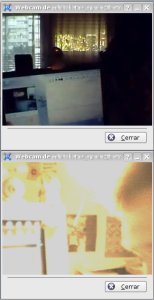
MSN video chat with Kopete

Microelectronics and the Personal Computer

Today I was looking in Google for some information about the Xerox PARC Alto computer system. Alto was the first experimental personal computer having a mouse, a window environment, ethernet booting capabilities, sound, light pen, microphone, music keyboard and SmallTalk programming language for the affordable cost of US $32000 (in 1979).

While searching for that information, I found an article written two months before I was birth by Alan Kay for Scientific American, named “Microelectronics and the Personal Computer“. In this article, Alan shows the system and unveils all its potential. Such a system was comparable, in that age, to the printing invention, radio or TV. Its main improvement was the ability to simulate an environment, to be used as a tool to rise human abstraction and trial/error capabilities.

Mr. Kay was also worried by the fact of all that potential could also be misused, in the same way that the fact for a city having a public library doesn’t automatically bring knowledge to its inhabitants, or broadcasting scientific TV programs doesn’t make the audience to become a scientific.

It’s a pity to see how some of the worst worries of Mr. Kay have become into reality. Nowadays children don’t use computers as a tool for world exploration and experimentation, but as a copy-paste machine, a hand bounded interactive movie.

It’s a pity to see how the hard work of teaching envisioners, like Seymour Papert, has been thrown away to the trash can. Learning tools, like the Logo programming language, have been dismissed, and new ones, like Squeak, are still unknown to the teachers nowadays.

We know what computers are today but, what could they have been?

Cryptographic Filesystem

Yesterday’ve been playing around with CFS in my Ubuntu. I’ve never tried a cryptographic filesystem before, altough I knew there were many flavours laying out there.

CFS has two main advantages, as far as I know:

  • It doesn’t require any special kernel patch (at least, not for Ubuntu), because it uses NFS to do loopback mounting of crypted directories.
  • It uses directly the underlying filesystem, avoiding the need of creating fs images to mount by loopback. Crypted directories and files are mapped to normal directories and files with its name and contents crypted.

The package provides some utilities:

  • cmkdir: Creates and initializes a crypted directory on the host filesystem.
  • cattach: Attaches a crypted directory, making it available (as cleartext) under /crypt/*.
  • cdetach: Dettaches a previously mounted crypted directory.

I’ve tried CFS successfully, and added it to my list of useful tools. It’s clean, easy and powerful. 🙂

Limited lifetime scripts

While helping Xavi with a small task (batch converting ODT documents to PDF via a web form), I’ve remembered a little recipe I’ve written some time ago.

It’s a way to force some script to die after a defined timeout. So, you can perform a command by ssh inside a script or perform any blocking task you want, and it will always return.

The only thing you have to do is to put these single 3 lines of code at the start of your bash script:

SECURITY_TIMEOUT=60
CMD_PID="$$";
{ sleep $SECURITY_TIMEOUT; kill -9 $CMD_PID; } 2>/dev/null &
Enjoy it!

SMTP and Cisco PIX firewall

Some months ago, I configured a complete mail gateway and other services for a client. As for almost every deployment, there were things that had to be investigated and one always learn something new.

One of the most surprising “curiosities” I found was about SMTP. When I telneted the SMTP gateway at port 25 from inside the intranet or localhost, the usual welcome message was displayed. But when I did the same from the internet, I received this weird welcome string:

220 **************************************

And when I tried to issue an ESMTP command (like EHLO), the server said that it wasn’t supported. What the hell??!! It can’t be! Someone or something is changing my packets!

After doing some searching at Google, I discovered who was the little guilty: a Cisco PIX firewall configured with the “fixup protocol smtp 25” option turned on. That was preventing internet users from authenticating and using TLS.

Thank you debian-administration.org guys!

Linex and Iberia

Past week I’ve travelled to Valencia to take a rest and see the city. A big city, by the way, altough people’s timetable was a bit “strange”, but that’s a different story…

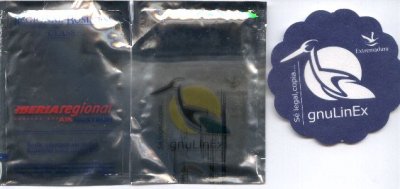
One of the most surprising things happened in the flight: in the plane there were glass coasters, napkins and even headrest covers with the advertisment “sé legal, copia GNU/Linex” (“be legal, copy GNU/Linex”).

It seems like Junta de Extremadura has made an agreement with Iberia to show Linex advertisments and offer Linex CDs and leaflets in some regional flights. What a good thing!

linex.jpeg

It’s a sad week

It’s a sad week. Galicia, our homeland, is burning in flames. At this moment, more than 50 fires are burning without control. And the worst of all is that the main part of them are caused by men.

I can’t believe how such unresponsible and stupid people can exist. What kind of madness or obscure interests can force them to cause a fire started in some points at the same time, in order to be difficult to suffocate it? What’s the point of so many FEDER grants, so many improvements and innovations, so many animal repopulation and tree reforestation, if at the end there are people that don’t care about Galicia?

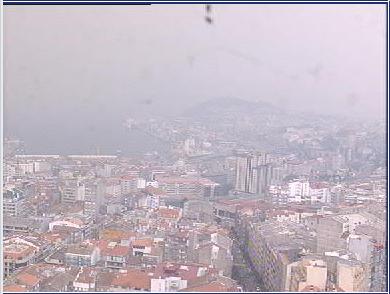
The time status at Vigo local weather station today wasn’t “sun”, “clouds” or “fog”, it was “smoke”. I’m desolated.

Smoke at Vigo (Pontevedra, Galicia, Spain)

Summer practices on PhpReport

PhpReport is a GPL web application that tracks tasks performed by a company staff or workgroup and allows administrators to launch queries and get statistics about the tasks and time spent on each one. This give company managers the proper information to do cost analysis and decission making. PhpReport is used internally by Igalia staff on daily basis since December 2003.

This summer Igalia has planned a “company practices” hiring to improve PhpReport. Jesús Pérez is the student selected, and he will make use of XP Tracker to manage his tasks. At this link you can follow his progress.

The improvements assigned to this development iteration satisfy new functional needs and publishing & community issues. Some of those improvements are:

  • Internationalization.
  • Migration of existing OpenOffice.org spreadsheets into PhpReport, to make result extraction and business decission making easier.
  • XML import module rewriting, to improve mantainability and extensibility of the application.
  • Administration and usage documentation.
  • Package improvements.

As a result of this iteration, a new release is planned for the end of the summer. Stay tuned!

NeoSudoku 1.2.1 GPL released!

I’ve worked a little more in NeoSudoku and at last it can:

  • Solve human targeted sudokus using the limited resources that the cell phone has.
  • Learn new sudokus (new board configurations input by hand)
  • It can’t save new sudokus to persistent storage, but it will be the next feature to come.

The rest of the features can be found on my past post. You can download it from here:

Enjoy it!