Some years ago I had mentioned some command line tools I used to analyze and find useful information on GStreamer logs. I’ve been using them consistently along all these years, but some weeks ago I thought about unifying them in a single tool that could provide more flexibility in the mid term, and also as an excuse to unrust my Rust knowledge a bit. That’s how I wrote Meow, a tool to make cat speak (that is, to provide meaningful information).
The idea is that you can cat a file through meow and apply the filters, like this:
cat /tmp/log.txt | meow appsinknewsample n:V0 n:video ht: \
  ft:-0:00:21.466607596 's:#([A-za-z][A-Za-z]*/)*#'
which means “select those lines that contain appsinknewsample (with case insensitive matching), but don’t contain V0 nor video (that is, by exclusion, only that contain audio, probably because we’ve analyzed both and realized that we should focus on audio for our specific problem), highlight the different thread ids, only show those lines with timestamp lower than 21.46 sec, and change strings like Source/WebCore/platform/graphics/gstreamer/mse/AppendPipeline.cpp to become just AppendPipeline.cpp“, to get an output as shown in this terminal screenshot:
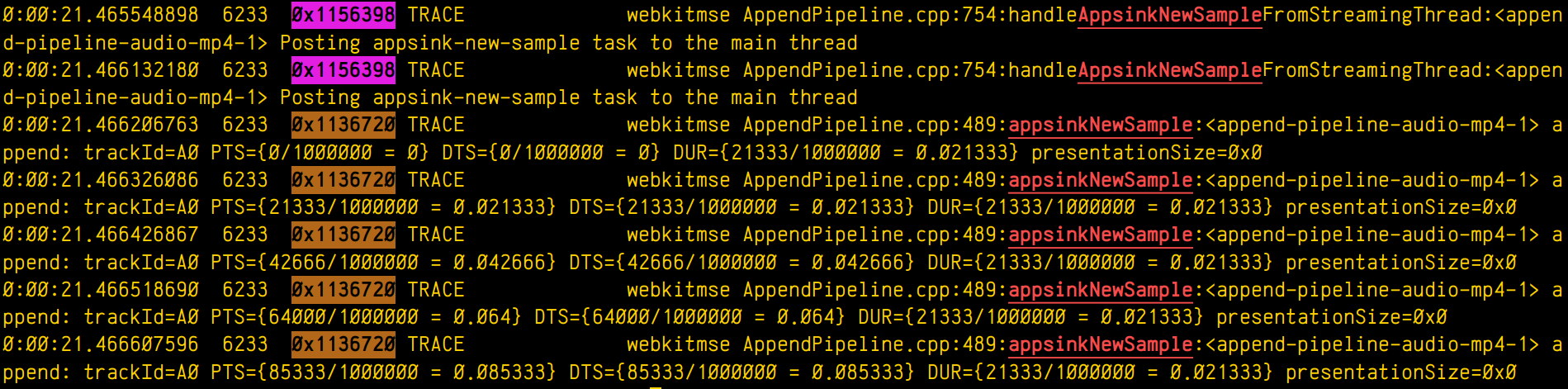
Cool, isn’t it? After all, I’m convinced that the answer to any GStreamer bug is always hidden in the logs (or will be, as soon as I add “just a couple of log lines more, bro” 🤭).
Currently, meow supports this set of manipulation commands:
- Word filter and highlighting by regular expression (
fc:REGEX, or justREGEX): Every expression will highlight its matched words in a different color. - Filtering without highlighting (
fn:REGEX): Same asfc:, but without highlighting the matched string. This is useful for those times when you want to match lines that have two expressions (E1,E2) but the highlighting would pollute the line too much. In those case you can use a regex such asE1.*E2and then highlight the subexpressions manually later with anh:rule. - Negative filter (
n:REGEX): Selects only the lines that don’t match the regex filter. No highlighting. - Highlight with no filter (
h:REGEX): Doesn’t discard any line, just highlights the specified regex. - Substitution (
s:/REGEX/REPLACE): Replaces one pattern for another. Any other delimiter character can be used instead of /, it that’s more convenient to the user (for instance, using # when dealing with expressions to manipulate paths). - Time filter (
ft:TIME-TIME): Assuming the lines start with a GStreamer log timestamp, this filter selects only the lines between the target start and end time. Any of the time arguments (or both) can be omitted, but the-delimiter must be present. Specifying multiple time filters will generate matches that fit on any of the time ranges, but overlapping ranges can trigger undefined behaviour. - Highlight threads (
ht:): Assuming a GStreamer log, where the thread id appears as the third word in the line, highlights each thread in a different color.
The REGEX pattern is a regular expression. All the matches are case insensitive. When used for substitutions, capture groups can be defined as (?CAPTURE_NAMEREGEX).
The REPLACEment string is the text that the REGEX will be replaced by when doing substitutions. Text captured by a named capture group can be referred to by ${CAPTURE_NAME}.
The TIME pattern can be any sequence of numbers, : or . . Typically, it will be a GStreamer timestamp (eg: 0:01:10.881123150), but it can actually be any other numerical sequence. Times are compared lexicographically, so it’s important that all of them have the same string length.
The filtering algorithm has a custom set of priorities for operations, so that they get executed in an intuitive order. For instance, a sequence of filter matching expressions (fc:, fn:) will have the same priority (that is, any of them will let a text line pass if it matches, not forbidding any of the lines already allowed by sibling expressions), while a negative filter will only be applied on the results left by the sequence of filters before it. Substitutions will be applied at their specific position (not before or after), and will therefore modify the line in a way that can alter the matching of subsequent filters. In general, the user doesn’t have to worry about any of this, because the rules are designed to generate the result that you would expect.
Now some practical examples:
Example 1: Select lines with the word “one”, or the word “orange”, or a number, highlighting each pattern in a different color except the number, which will have no color:$ cat file.txt | meow one fc:orange 'fn:[0-9][0-9]*'
000 one small orange
005 one big orange
Example 2: Assuming a pictures filename listing, select filenames not ending in “jpg” nor in “jpeg”, and rename the filename to “.bak”, preserving the extension at the end:$ cat list.txt | meow 'n:jpe?g' \ 's:#^(?<f>[^.]*)(?<e>[.].*)$#${f}.bak${e}'
train.bak.png
sunset.bak.gif
Example 3: Only print the log lines with times between 0:00:24.787450146 and 0:00:24.790741865 or those at 0:00:30.492576587 or after, and highlight every thread in a different color:$ cat log.txt | meow ft:0:00:24.787450146-0:00:24.790741865 \
ft:0:00:30.492576587- ht:
0:00:24.787450146 739 0x1ee2320 DEBUG …
0:00:24.790382735 739 0x1f01598 INFO …
0:00:24.790741865 739 0x1ee2320 DEBUG …
0:00:30.492576587 739 0x1f01598 DEBUG …
0:00:31.938743646 739 0x1f01598 ERROR …
This is only the begining. I have great ideas for this new tool (as time allows), such as support for parenthesis (so the expressions can be grouped), or call stack indentation on logs generated by tracers, in a similar way to what Alicia’s gst-log-indent-tracers tool does. I might also predefine some common expressions to use in regular expressions, such as the ones to match paths (so that the user doesn’t have to think about them and reinvent the wheel every time). Anyway, these are only ideas. Only time and hyperfocus slots will tell…
By now, you can find the source code on my github. Meow!